Ohio UST-1 Multi-County Sales Tax Return Guide (2026)
Turn sales data into an Ohio UST-1 county schedule: origin sourcing, exempt vs. taxable sales, the $750-per-month discount cap and split-rate periods.
Month-end, and the point-of-sale export has 4,000 lines. Some sales were tax-exempt, two store locations sit in different counties, and one county changed its rate halfway through your semiannual period. The Ohio UST-1 asks for taxable sales and tax by county. A missed county or a wrong rate turns into a notice from the Ohio Department of Taxation months later.
This guide shows how to turn raw sales data into a clean UST-1 county schedule, check it against the tax you actually collected, and claim the full vendor discount.
How the Ohio UST-1 Return Is Structured
The UST-1 is Ohio's sales tax return for vendors with a vendor's license. You file it in OH|TAX eServices. It boils down to:
- Gross sales: everything you sold in the period.
- Exempt sales: tax-free sales (resale, exempt organizations, exempt items).
- Net taxable sales: gross minus exempt.
- County schedule: taxable sales and tax liability for each county where your sales are sourced.
- Vendor discount and net amount due.
For a step-by-step walkthrough of the OH|TAX screens, see how to file and pay Ohio sales tax online. For the calendar, see Ohio sales tax due dates or use our free filing calendar tool.
Step 1: Decide Which County Each Sale Belongs To
Ohio vendors use origin sourcing for most in-state sales. Under R.C. 5739.033(B)(1), a sale is generally sourced to where the vendor receives the order. That's good news for reporting:
- One location: all of your in-state sales are usually reported in your home county.
- Several locations: each store, office, or warehouse that receives orders reports its own sales in its own county.
- Remote sellers shipping into Ohio follow different (destination) sourcing rules. See selling into Ohio.
The most common mistake we see is a vendor that grouped sales by customer county instead of the location county. For an in-state vendor with one store, that spreads tax across counties that shouldn't appear on the return at all.
Step 2: Separate Exempt Sales and Back Them With Certificates
Every tax-free sale needs a reason, and most need a certificate. Before the return:
- tag each exempt sale in your export (
taxable = no); - confirm a STEC-B or STEC-U certificate is on file for the customer;
- chase any missing certificates now. Ohio presumes a sale was taxable if no certificate is obtained within 90 days (R.C. 5739.03(B)(4)).
Our guide on collecting exemption certificates from customers covers the workflow.
Step 3: Build the County Schedule
For each county: taxable sales × that county's combined rate = tax liability. Use the rate that applied on the sale date. Ohio counties can only change rates on the first day of a calendar quarter, and the Tax Commissioner must give vendors at least 60 days' notice (R.C. 5739.021).
Current county rates are listed in our Ohio sales tax rate by county table.
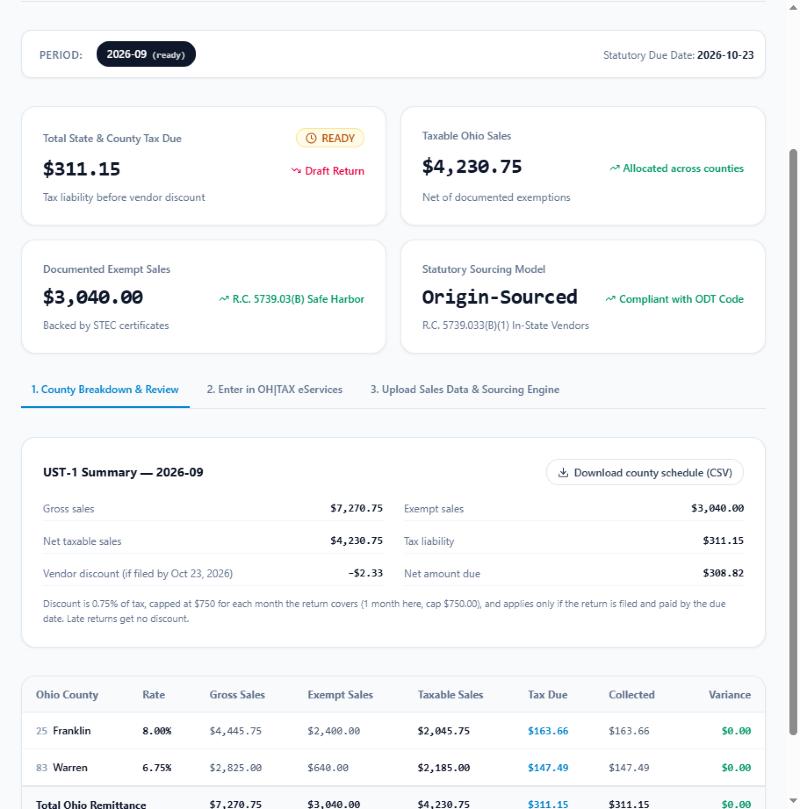
Ohio Sales Tax Pro builds the county schedule from an uploaded sales CSV, using the rate in effect on each sale date, and flags any county where tax collected doesn't match tax due.
Split-rate periods (semiannual filers, read this)
When a county's rate changes in the middle of a semiannual period, one return covers two rates for that county. Warren County shows how: it rose from 6.75% to 7.25% on October 1, 2026, so a semiannual filer's July–December 2026 return covers both rates.
ODT's file-upload instructions handle this by listing the county twice. The quarter at the original rate gets a 2 in front of the county number. ODT's own example is Lake County: code 243 for January–March 2020 at 7.0%, and code 43 for April–June 2020 at 7.25%.
Step 4: Reconcile Tax Due vs. Tax Collected
Your county schedule says what you owe. Your register says what you charged. Line them up by county:
| Result | What it usually means | What to do |
|---|---|---|
| Collected = due | Rates and sourcing are right | File |
| Collected < due | A register or e-commerce rate is wrong, or exempt sales lack certificates | Fix the rate going forward, and collect the missing certificates |
| Collected > due | An outdated (higher) rate, or tax charged on exempt sales | Correct the system, and talk to your CPA about the over-collected tax |
Under-collection is the expensive case. The tax is still due, and it comes out of your margin.
Step 5: Claim the Vendor Discount, With the 2026 Cap
If you file and pay by the due date, Ohio lets you keep a discount of 0.75% of the tax due. Starting January 1, 2026, the discount on sales other than motor vehicle sales is capped at $750 per vendor's license for each month covered by the return (R.C. 5739.12(B)(1); ODT ST 2025-02).
| Filing frequency | Months covered | Maximum discount |
|---|---|---|
| Monthly | 1 | $750 |
| Semiannual | 6 | $4,500 |
The cap only bites at about $100,000 of monthly tax ($750 ÷ 0.0075), so most small vendors keep the full 0.75%. Larger vendors should budget for the cap.
Step 6: File by the 23rd, Including Zero Returns
Monthly returns are due on or before the 23rd of the month after the reporting month (R.C. 5739.12(A)(1)). File even when you had no sales. A missing return can trigger an additional charge and an estimated assessment. To see what a late return could cost, use the late-filing penalty estimator.
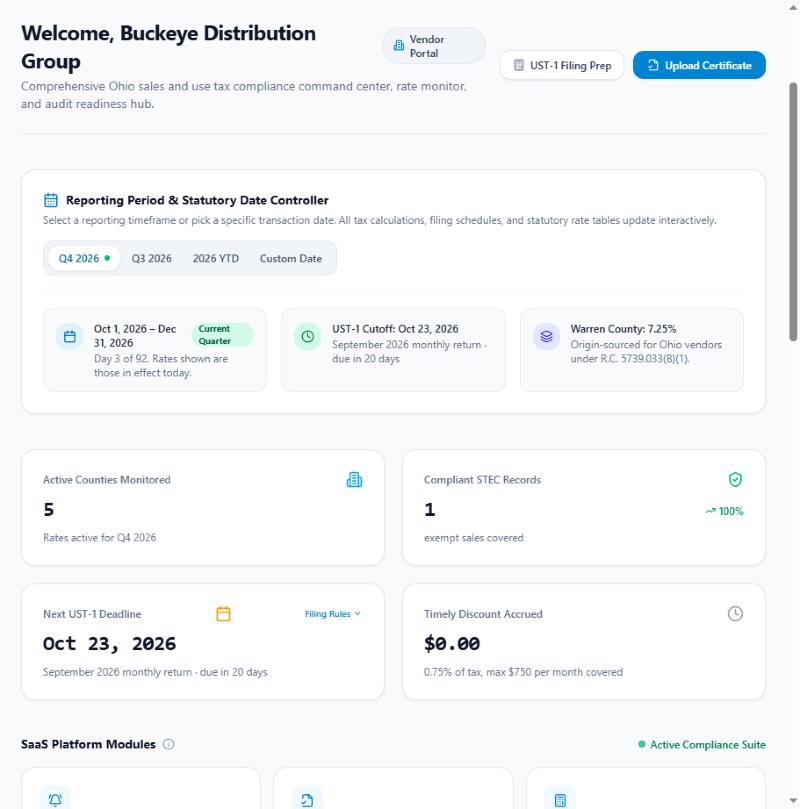
The dashboard shows the next UST-1 due date for your filing frequency, monitored county rates and your audit readiness score.
Doing This Every Month Without a Spreadsheet Marathon
Steps 1–5 are mechanical once your data is clean, which makes them easy to automate. Ohio Sales Tax Pro's filing prep does the mechanical part:
- imports a sales CSV;
- applies the dated county rates;
- separates exempt sales;
- flags collected-vs-due variances;
- calculates the capped discount;
- exports the county schedule for OH|TAX eServices.
You still review and file. The tool removes the arithmetic and the guesswork.
Frequently Asked Questions
How do I report Ohio sales tax for multiple counties? The Ohio UST-1 return asks for taxable sales and tax liability by county. Total your taxable sales for each county where your sales are sourced, apply that county's combined rate, and enter each county line in OH|TAX eServices, or upload them using ODT's .xlsx file-upload option for multi-county filers.
Which county do I report a sale in if I'm an Ohio vendor? Ohio vendors use origin sourcing for most in-state sales. Under R.C. 5739.033(B)(1), a sale is generally sourced to where the vendor receives the order, so a business with one location usually reports everything in its home county, while a business with several stores reports each store's sales in that store's county.
When is the Ohio UST-1 return due? Monthly filers must file and pay on or before the 23rd day of the month after the reporting month (R.C. 5739.12(A)(1)). Semiannual filers file for January–June and July–December, with returns due on the 23rd of the month after each period ends.
How much is the Ohio vendor discount? Vendors that file and pay on time keep a discount of 0.75% of the tax due. Starting January 1, 2026, the discount on sales other than motor vehicle sales is capped at $750 per vendor's license for each month covered by the return, so $750 on a monthly return and $4,500 on a semiannual return (R.C. 5739.12(B)(1); ODT ST 2025-02).
What if a county's rate changed in the middle of my filing period? County rate changes take effect on the first day of a calendar quarter (R.C. 5739.021). Semiannual filers can have two rates for one county in a single return. ODT's file-upload instructions handle this by listing the earlier-rate quarter with a 2 in front of the county number.
Do I have to file an Ohio sales tax return with zero sales? Yes. If you hold an active vendor's license you are expected to file for every period assigned to you, including periods with no sales. Missing returns can trigger an additional charge and an estimated assessment.
Prepare Your Next UST-1 in Minutes
Upload last month's sales, review the county schedule, and file in OH|TAX eServices with numbers you can defend. Create a free Ohio Sales Tax Pro account or see how filing prep works.
Sources & Statutory Citations
- Ohio Revised Code 5739.12: return due dates and the vendor discount with its per-month cap
- Ohio Revised Code 5739.033: sourcing of sales
- Ohio Revised Code 5739.021: county rate changes on the first day of a calendar quarter
- Ohio Revised Code 5739.03: exemption certificates and the 90-day presumption
- ODT ST 2025-02: Vendor Timely Filing Discount
- ODT: UST-1 Data File Upload instructions
Ready to run the numbers?
Get your result instantly — private, in your browser.
Cite & Attribute This Resource
Ohio CPA & Small Business Advisor. (2026). "Ohio UST-1 Multi-County Sales Tax Return Guide (2026)". Verified against Ohio Department of Taxation records. Retrieved from https://www.ohiosalestaxcalculator.com/blog/ohio-sales-tax-return-reconciliation-multi-county
Permitted for quotation and attribution in professional, journalistic, legal, and academic works.
About the author
Researched, authored, and audited by our dedicated Ohio sales tax research team. Every county tax rate, municipal transit levy, statutory exemption rule (R.C. 5739), and UST-1 return schedule is audited directly against official Ohio Department of Taxation reports and the Ohio Revised Code.